
Guides
Evitania Online: How To Organize Your Stash
How to set up stash tabs from Act I through endgame — act-based or role-based layouts, mule characters for extra storage, and a buffer rule so you never lose rare drops to a full inventory.
Long-form guide — scroll straight through, or use the index to jump to a section.
Evitania throws a lot of item types at you fast. By Act 2, monster drops, gathering mats, quest rewards, and boss loot often end up in one tab — and a full stash means missed rare drops. This guide shows two proven layouts, how to use mule characters for free extra tabs, and a simple buffer rule you can run from Act 1 through endgame.
Why Organize Your Stash?
Without a layout, you spend more time sorting than playing. By mid-Act 2, one tab holds act-specific loot, woodcutter jackets, charcoal stacks, pet gear, enhancement stones, and rare boss drops. Finding anything slows you down; a full stash blocks new pickups entirely.
Organizing by progression (which act you earned it in) or function (how you use it) fixes both problems. Pick one approach below and stick with it until a patch forces a change.
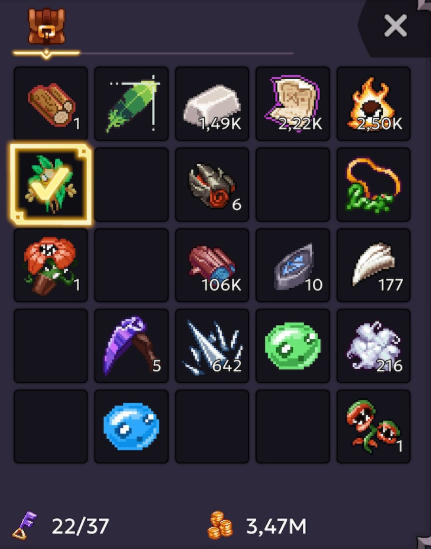
Step 1: Set Up Your Tab Layout
Option A — Act-based tabs
Best if you want loot grouped by when you earned it.
- Tab A — Act 1: Quest and monster drops from Act 1
- Tab B — Act 2: Act 2 loot
- Tab C — Act 3: Act 3 loot
- Gathering tab: Wood, ore, charcoal, and your woodcutter jacket
- Other tab: Rare boss materials, event items, anything that does not fit above
Option B — Role-based tabs
Best if you want items grouped by how you use them.
- Tab 1 — Upgrade & rare: Enhance Stones, Hourglasses, boss items, and very rare drops (feathers, essence, chroma)
- Tab 2 — Pets & gear: Pets, pet items, and gear you are holding for later
- Tab 3 — Crafting: Wood, ore, charcoal, and other smithing materials
Either layout works from Act 1 onward. Switch only if your playstyle changes — for example, when you start juggling more acts at once.
Step 2: Use Mule Characters for Extra Space
Each extra character is a free stash tab. Assign one mule per act:
- Char 4 — Act 1 drops
- Char 3 — Act 2 drops
- Char 2 — Act 3 drops
On your main, keep only active gathering and monster loot in your inventory. Stash only what you need daily: wood, woodcutter jacket, charcoal. Move everything else to mules or their dedicated tabs.
Step 3: Keep a Stash Buffer on Your Main
Always leave 5–6 empty stash slots on your main character. That buffer stops the "stash full" popup mid-dungeon and gives you room to pick up new loot without sorting on the spot.
Tips & When to Adjust
- New item types in patches: Add a slot to your "Other" tab or bump rare items up in priority.
- Running out of tabs: Prioritize rare and boss items over common drops — basic materials are easy to re-farm.
- More stash tabs added later: Rework your layout or expand your mule network.
Sharing on Steam forums: Steam does not allow inline images. Describe your layout in text — "Act 1 drops tab, Gathering tab, Other tab" — or link an externally hosted screenshot.
An organized stash saves time, not just space. For pet items, see the pet guide; for gathering material lists, use the woodcutting and mining databases.
See an error or have something to add? Become a contributor — corrections and additions help grow this project, and we credit helpers on the Contributors page.