
Guides
Evitania Online August 2026 Update: New Quest System, Performance Boosts, and 300 Gem Reward
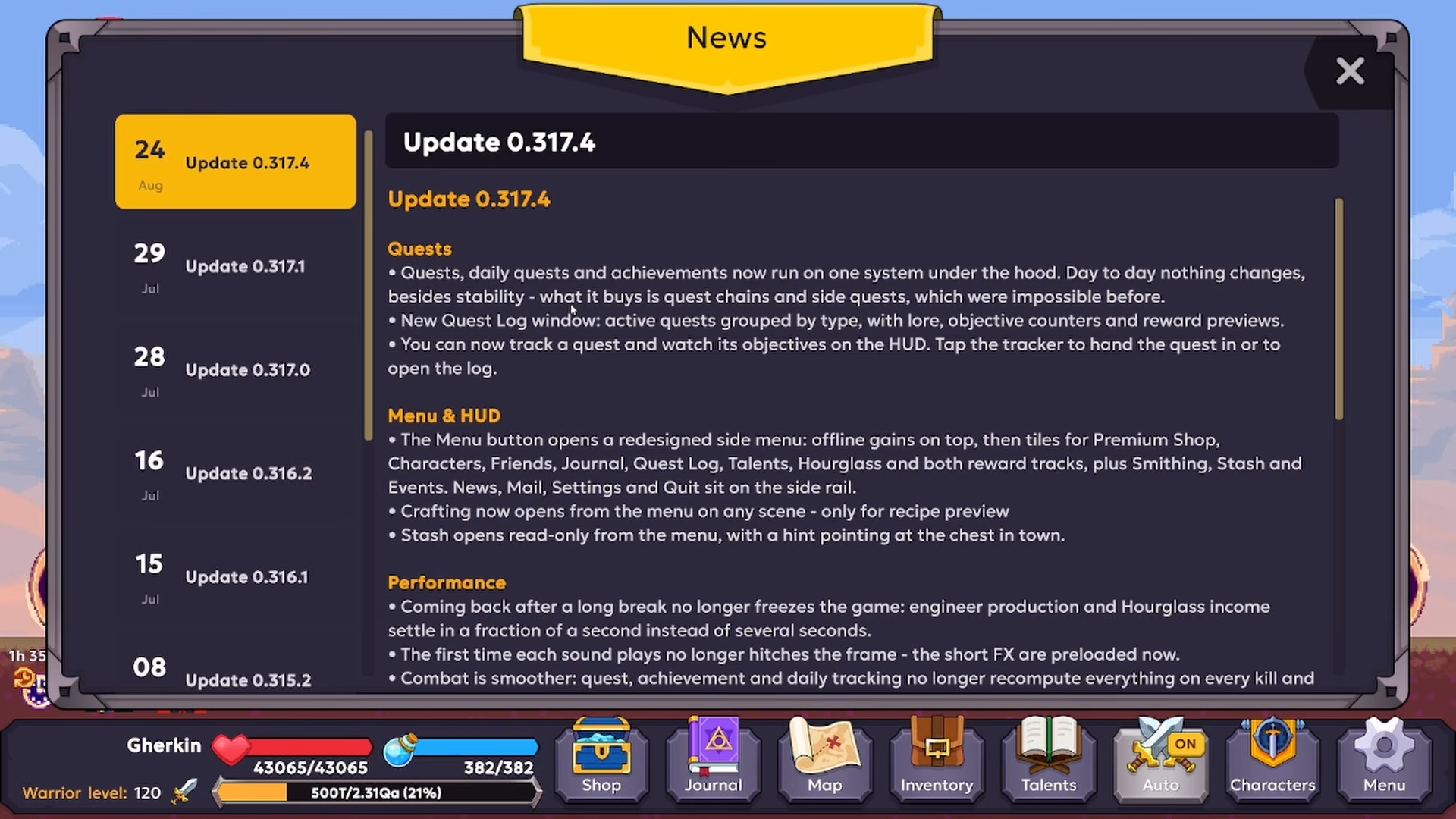
August 25 patch breakdown — claim 300 gem compensation, the unified quest log and HUD menu, performance fixes, crash patches, and shop/Steam/Android polish.
Long-form guide — scroll straight through, or use the index to jump to a section.
The August 25 patch dropped a lot at once: a unified quest system, a full HUD redesign, major performance surgery, and a free 300 gem compensation reward sitting in your mail. I've gone through every change so you don't have to hunt for the important parts. Here's exactly what's new, what got fixed, and the precise steps to claim those gems before you do anything else.
Quick Answer
Claim your 300 gem reward by opening the folder mentioned in the update notes (likely the in-game mail or reward section). The character level bug from the previous day has been patched, and affected accounts have been sorted out. If you're still experiencing the issue, follow the fix instructions provided in that same update folder. After that, check the new quest log, test the redesigned side menu, and enjoy the smoother combat and faster saves.
Where I Start After the Update: Claiming the 300 Gems
The first thing on my list was the compensation. A major bug from the day before messed up character levels — some players got reduced, others got increased. The devs patched it and sorted out the affected accounts, then granted 300 gems to everyone as compensation.
You need to go to the folder mentioned in the update notes (likely the in-game mail or reward section) and claim your gems. If you are still suffering from the level issue, instructions on how to fix it are provided there.
Note: I always claim compensation first. It's the only part of an update that can disappear if you ignore it, and 300 gems is a solid head start for whatever you're grinding next.
The New Quest System and Quest Log: What Changed and How I Use It
The old, clunky quest tracking is gone. Daily quests, achievements, and quests now run on a unified system, which enables future quest chains and side quests. This is a structural change that makes everything feel connected.
The new quest log window groups active quests by type, showing lore, objective counters, and reward previews. I can track a quest and view its objectives on the HUD; tapping the tracker hands in the quest or opens the log.
Here's my workflow:
- Open the quest log from the side menu to see everything grouped by type.
- Tap a quest to track it on the HUD.
- Tap the HUD tracker to either hand in the quest or jump back into the log.
This saves me from constantly opening menus mid-combat. The objective counters update in real time, and the reward previews let me decide if a quest is worth the detour.
The Redesigned Menu and HUD: Where Everything Lives Now
The menu button opens a redesigned side menu, and it's a big layout shift. Here's the order: offline games on top, followed by tiles for premium shop, character, friends, journal, quest log, talents, hourglass, and both reward tracks (event and monthly).
Two changes I immediately appreciate:
- Crafting is now accessible from the menu on any scene. I can view recipes without returning to the blacksmith. This is a huge time-saver when I'm deep in a dungeon and need to check what I can build.
- The stash opens read-only from the menu. I can check my inventory without going back to town. No more teleporting just to see if I have a specific material. For long-term inventory planning, see the stash organization guide.
Tip: Use the read-only stash to plan your crafting before you commit to a trip back. You'll save a ton of travel time. The hourglass tile is still the same currency — see the Hourglasses guide if you need a refresher on what they skip and what they ignore.
Performance Improvements: What I Noticed in My Session
The patch notes list a ton of performance fixes, and I tested most of them in my first hour. Here's what stood out:
- Returning after a long break no longer freezes the game. This was a major annoyance before.
- Engineer production and hourglass income settle in a fraction of a second. No more waiting for the numbers to catch up.
- First-time sound plays no longer hitch the frame. Effects are preloaded now.
- Combat is smoother. This is the most noticeable change.
- Quests, achievements, and daily tracking no longer recompute everything on every kill or loot pick-up. This was a hidden performance drain.
- Saving is faster and no longer stalls the game.
- Claiming a pile of mail no longer floods the cloud with saves. Sending mail also costs less.
- Cosmetics are only rebuilt when they actually change.
The combat smoothness is the win here. The game feels more responsive, and the lack of hitches during sound effects or kill tracking makes a real difference in flow.
Bug Fixes: The Crash List That Got Squashed
The update fixed a serious list of crashes. If you hit any of these before, they're gone now:
- Crashes when dragging or moving inventory stacks.
- Crashes when using the craft window.
- Crashes when tapping the weapon slot with a Layla or Lawn skin equipped.
- Crashes when an enemy health bar came back into use.
- Crashes during Jotun and Chomper fights.
There's also a smart save fix: a save file damaged by a kill mid-write is now recognized, and the backup is used instead of crashing. Network hiccups during auto-save, room rejoin, or party invites no longer surface as crashes either.
Shop, Steam, and Android Improvements: The Platform Polish
The shop catalog is now fetched in smaller batches, so the shop no longer gets stuck on placeholder prices, empty skins, pet tabs, or non-functional buy buttons. This was a mess before if you had a slow connection.
On Steam, changing your account no longer breaks purchases. The game repairs the link to the Steam client you are actually running. Discord rich presence has been removed, so don't be surprised if your friends stop seeing your game status.
On Android, the game now draws under the camera cutout on every edge. Foldables, tablets, and landscape devices no longer get a black bar with unreachable UI. This is a quality-of-life win for anyone on a modern phone or tablet.
See an error or have something to add? Become a contributor — corrections and additions help grow this project, and we credit helpers on the Contributors page.